
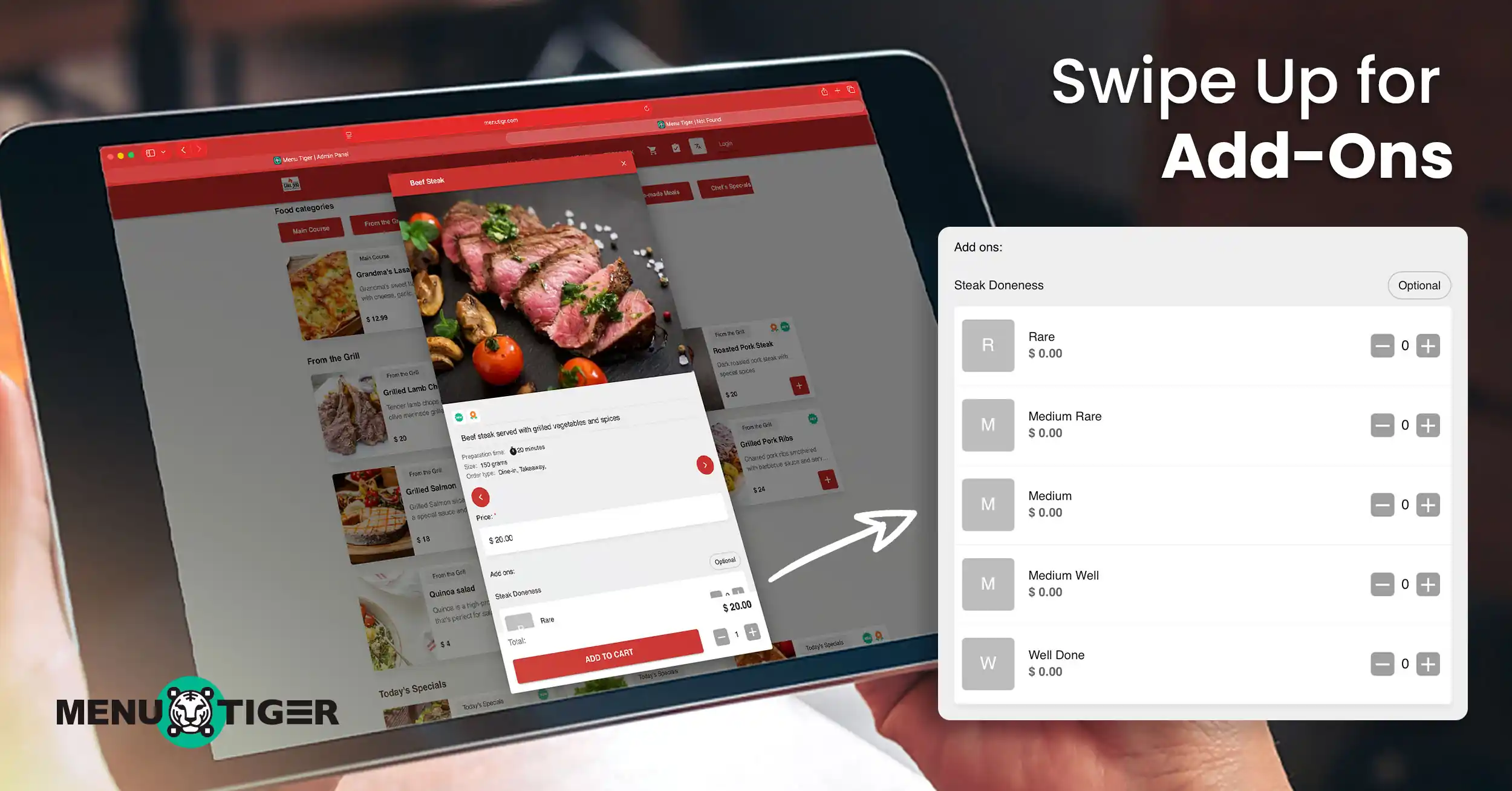
How To Add Choices And Add ons To Your Menu
Last Updated: September 18, 2026
Choices and add ons to your menu do more than just satisfy customer cravings. They, in fact, increase average order value and boost profit margins.
Since add-ons use low-cost ingredients sold at a premium, they deliver higher margins than standard menu items.
A study by TryServd shows that using well-structured modifiers combined with effective upselling techniques can increase revenue per order by 15–30% with minimal cost.
These small extras are a smart, profitable strategy that keeps customers satisfied while growing your revenue.
How to add choices and add ons to your menu
Note: Make sure you have a digital menu first. You can make one either with MENU TIGER’s automatic AI Menu Maker or using the Manual Menu Maker before you can set up your add ons menu.
1. Go to the MENU section.
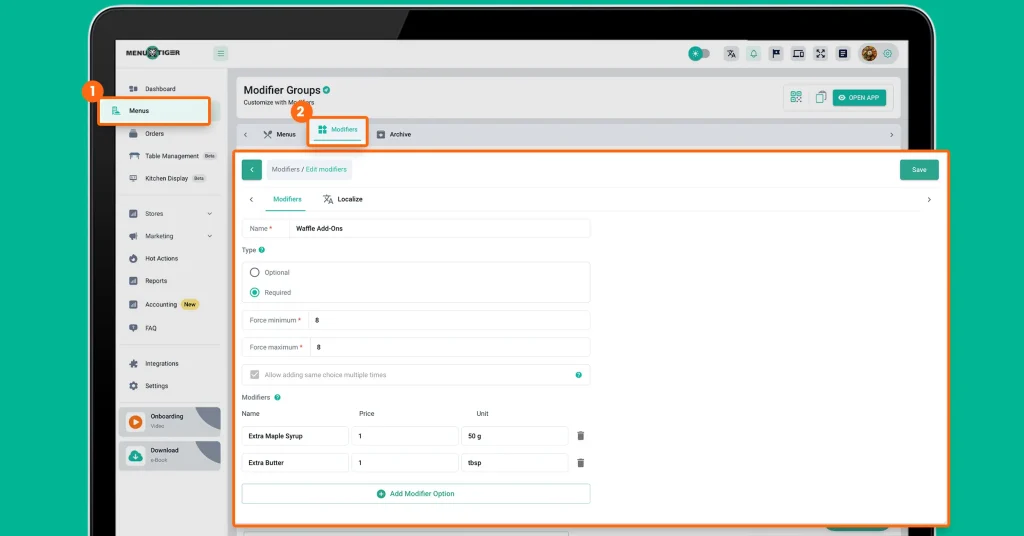
Navigate to the Menu section and select Modifier.
2. Create a Modifier Group.
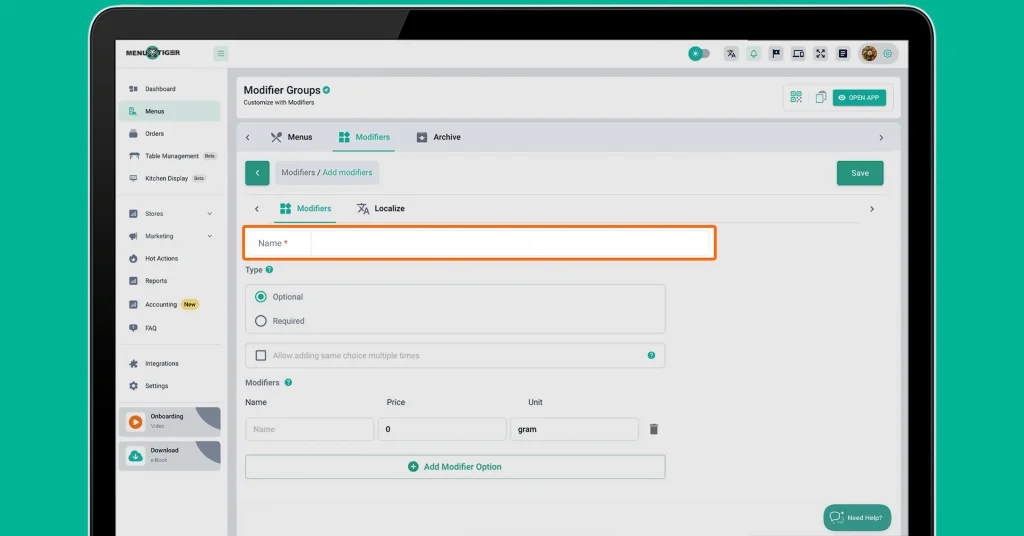
Enter a name for your modifier group.
This serves as a set of options or add-ons that appear below the main dish on your digital menu, allowing customers to customize their order.
3. Choose ‘Optional’ or ‘Required’ and set rules.
Choose Optional for non-compulsory items or Required for mandatory add-ons.
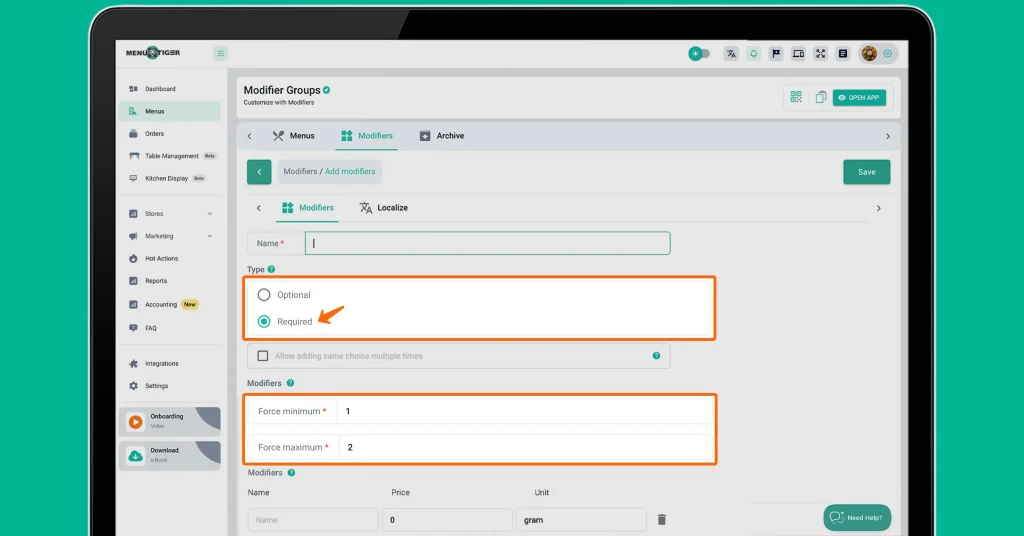
For Required modifiers, set the minimum and maximum number of choices (e.g., 1–2 sauces).
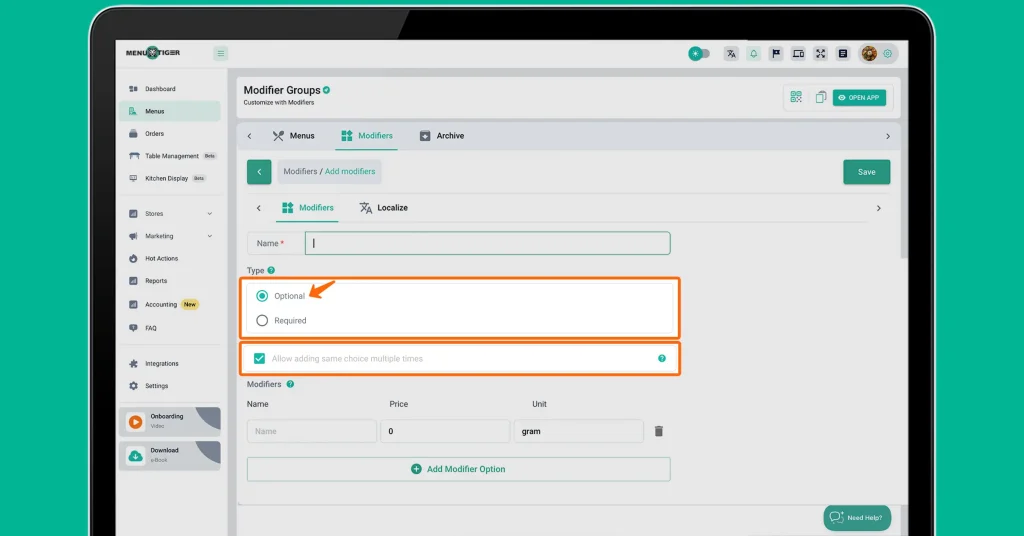
For Optional modifiers, you can allow or restrict selecting the same option multiple times.
4. Add Modifier Options.
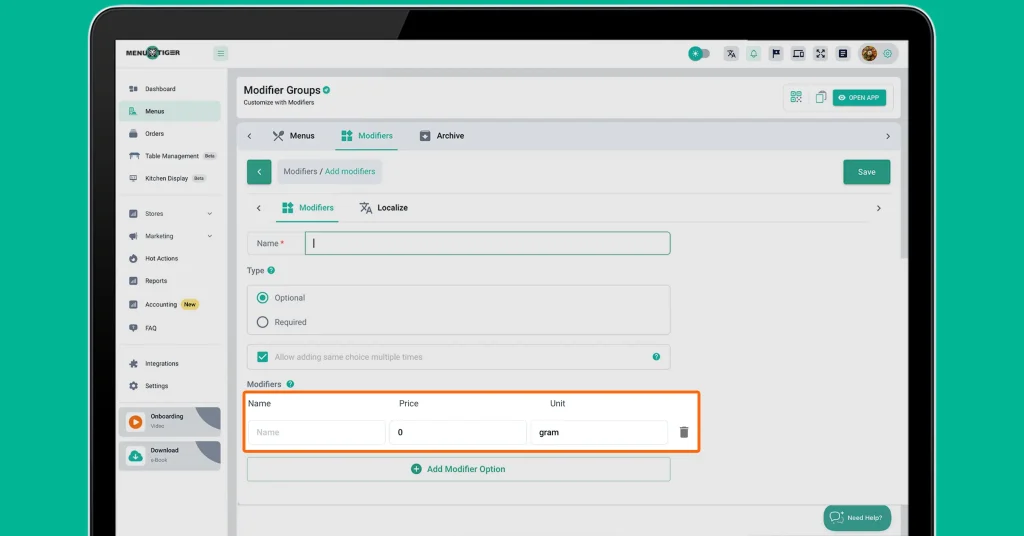
Enter the modifier name, price, and unit.
To add more options, click Add Modifier Options and repeat the process.
Once done, click Save.
5. Go to Menus and choose food items.
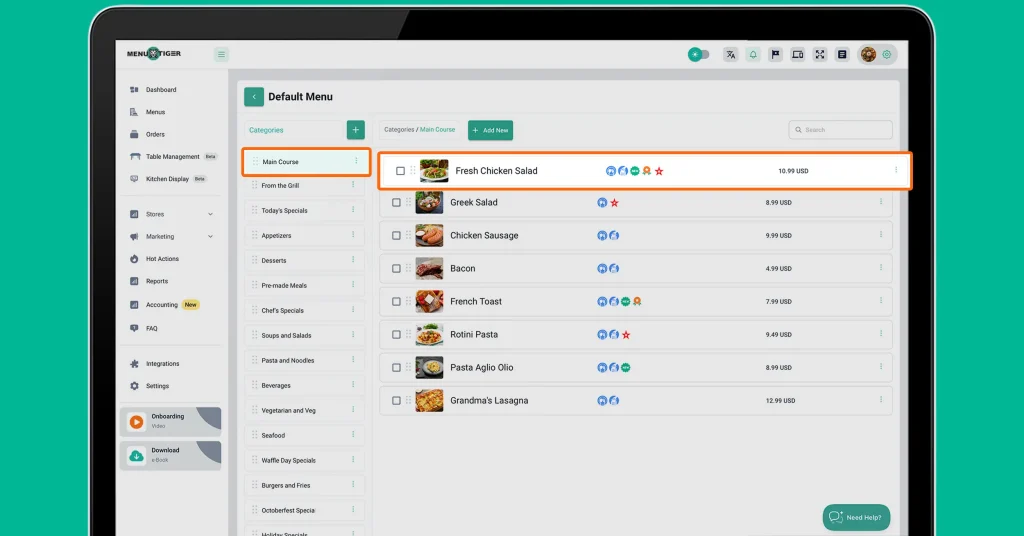
On the upper right, next to “Modifier,” click “Menu.” Once there, select a menu you created and hover over “Categories.”
Under each category, you’ll see a list of food items.
Click the food item where you want to add modifiers.
6. Apply modifiers to food items.
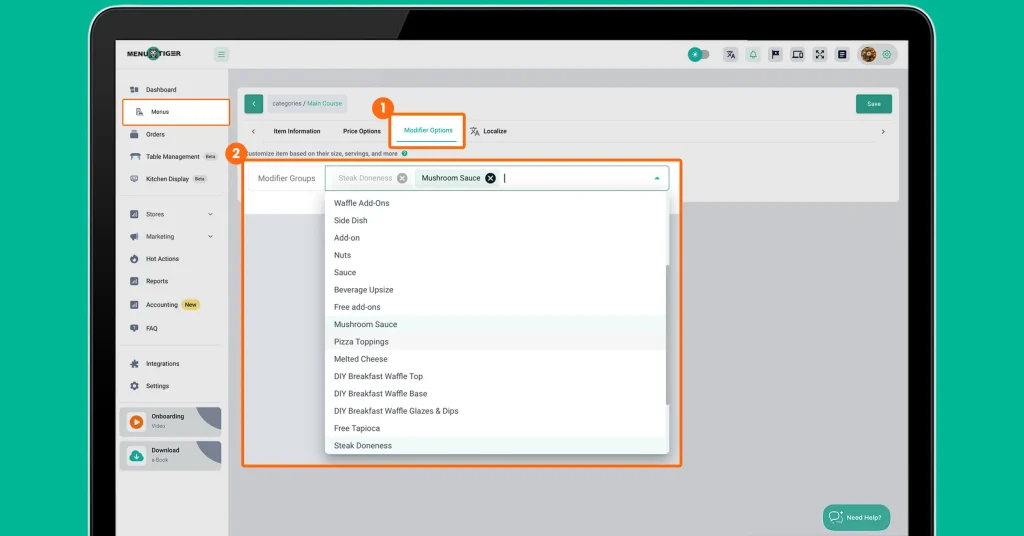
Click Modifier Options and select the modifier group you created.
Once applied, all modifier options under that group will be available for customers when ordering.

Benefits of offering choices and add ons to your menu
1. Increases average order value
The biggest benefit of add-ons in any type of menu is simple: higher revenue per customer.
- Upselling with add-ons food menu can increase average order value by 15% to 30%. (TryServd, 2026)
- Digital menus that highlight add-ons can boost order value by 15–20% (Foodini, 2025)
With proper structure and menu themes, even small add-ons like sauces or drinks can add a few extra dollars per order, which adds up significantly over time.
2. Improves customer satisfaction and loyalty
According to Deloitte, personalization and customization are key factors in improving dining satisfaction.
Take Chipotle as an example. They built their entire concept around customization, letting customers choose every ingredient in their meal.
This “build-your-own” approach has helped the brand maintain strong customer loyalty and consistent growth, showing how powerful menu choices can be.
3. Encourages exploration without changing your core menu
Add-ons on food menus allow your customers to try something new without committing to a completely different dish.
Domino’s offers a wide range of toppings and add-ons, allowing customers to experiment with flavors while keeping the base product the same.
This approach keeps the menu simple while still offering variety.
4. Reduces waste through ingredient flexibility
According to the National Restaurant Association (NRA), repurposing surplus food and unused ingredients into new products or offerings has become a key part of waste-reduction strategies.
In the context of add-ons, leftover vegetables, sauces, or other ingredients can be turned into profitable extras instead of going to waste, reflecting current menu trends.
This approach reduces food waste and increases revenue by creating value from items that would otherwise sit unused.
5. Tests cross-selling opportunities
Add-ons allow you to experiment with items like your drink menu, which can later become standalone products, helping you identify potential bestsellers before fully investing.
For example, in Starbucks, customers often customize beverages with different milks, syrups, or other combinations.
Drinks like the Dragon Drink and Pink Drink started as popular customer customizations before becoming widely marketed offerings on the official Starbucks menu.
These began as modified drink orders long before being formally added as products.
5 pro tips on how to upsell add ons in menu effectively
1. Use a restaurant ordering system.
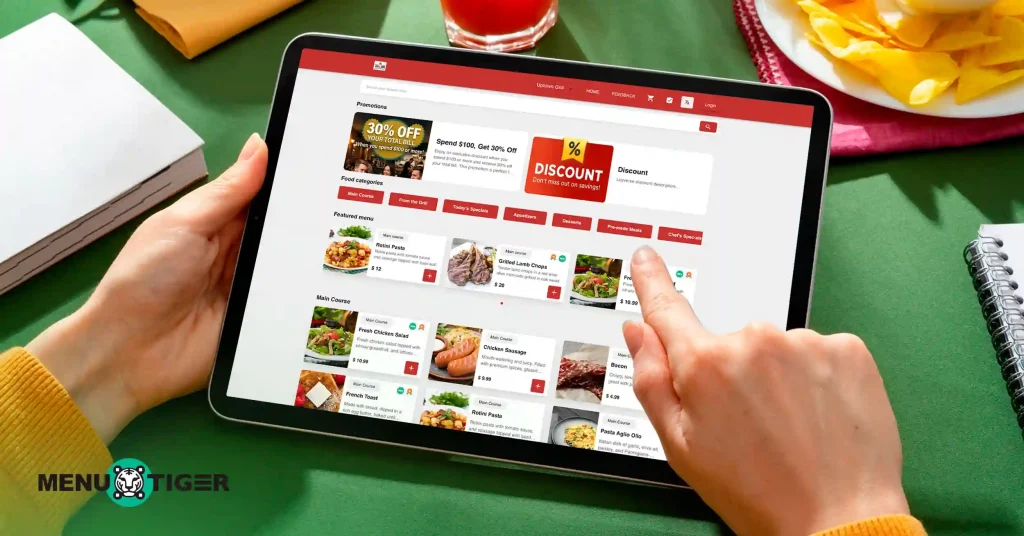
Many restaurant ordering systems include a section where you can highlight promotions, discounts, and special offers. Use this to perform upselling tactics.
Take delivery apps as an example. They commonly display add-on suggestions before checkout.
Alongside these suggestions, you’ll often see separate promotional offers, such as a “Pro Plan” that provides free delivery once a minimum order is reached, or vouchers that offer 30% off for orders worth at least $100.
This encourages customers to purchase add-ons to reach the threshold and take advantage of the offer.
2. Tap into pain and pleasure (Buying Psychology)
In business, there is a concept called “No Pain, No Sell.”
It means suggestive selling is ineffective if you don’t tap into the strongest emotions that drive people to take action, which are both pain and pleasure.
For example, at temperatures below 0 °C (32 °F), customers are unlikely to buy ice cream, but they will purchase hot coffee. The cold is the pain, and the hot coffee is the pleasure that relieves it.
Upselling works best when you align your menu add-ons with what customers are already feeling.
3. Create a sense of “wanting more.”
There is always that one sauce or side that perfectly complements a dish. Restaurants use this to encourage customers to add more items to their order.
For example, when a customer orders a six-piece buttered chicken, it is typically served with a complimentary sauce. However, the portion is usually limited and may not be sufficient for the entire serving.
As a result, customers are more likely to order extra sauce to fully enjoy their meal.
This approach creates a subtle yet effective upselling opportunity by aligning with customer preferences rather than forcing additional purchases.
4. Focus on the value
When upselling, avoid being overly sales-driven. If you push too hard, customers may feel that the offer is forced and that you are trying to sell rather than enhance their dining experience.
The key is to slightly adjust the main dish to feel slightly lacking without the add-ons, so the added value naturally becomes the appealing choice.
Show how the main dish feels more complete, flavorful, or satisfying when paired with the extras without making the customer feel pressured.
5. Make a bundle
This approach is often seen in the form of a “side dish,” where a required add-on is included with a meal. It is an effective strategy because it removes the need for customers to decide whether to add extras or not.
BigCommerce believed that, in upselling and cross-selling strategies, automatically pairing a main dish with sides like fries or a drink can increase the total order value.
Customers are more likely to accept the bundle since it feels complete and convenient rather than optional.
This makes upselling seamless, as the add-ons are positioned as part of the meal rather than an additional cost.

Add a little extra, earn a lot extra. Upgrade your menu with add-ons today.
Integrating choices and add ons to your menu is a whole lot more than just a technical update. Take it as a fundamental shift toward a more profitable and customer-centric business model.
You take control of high-margin menu add-ons, and your diners can customize their meals to enjoy a personalized experience. This is a win-win.
Don’t let these easy wins stay off your menu. Start by adding your first modifier group using an order management system like MENU TIGER, and see how a few small choices can create a big impact on your bottom line
FAQs

Eulla
Eulla joined MENU TIGER’s Content Team with a foundation in English teaching. She combines language expertise and creativity to produce engaging content that educates audiences and drives meaningful results.
Affiliates





© 2026 Menu Tiger. All rights reserved